Magento 2 is a powerful e-commerce platform that needs a properly sized server. Run your store on a VPS or dedicated server with full root access, NVMe storage, OpenSearch, Redis and Varnish, with help from our team to set it up and tune it. Prices in rupees, support in Urdu and English.
Magento hosting for serious Pakistani online stores
Magento (now Magento Open Source and Adobe Commerce) is the platform of choice for larger online stores: fashion and textile brands with thousands of product variations, electronics and appliance retailers, wholesalers with customer-specific prices, and businesses selling in several currencies or to several countries. Pakistani brands use it when they outgrow simpler platforms and need advanced catalogue, pricing and multi-store features.
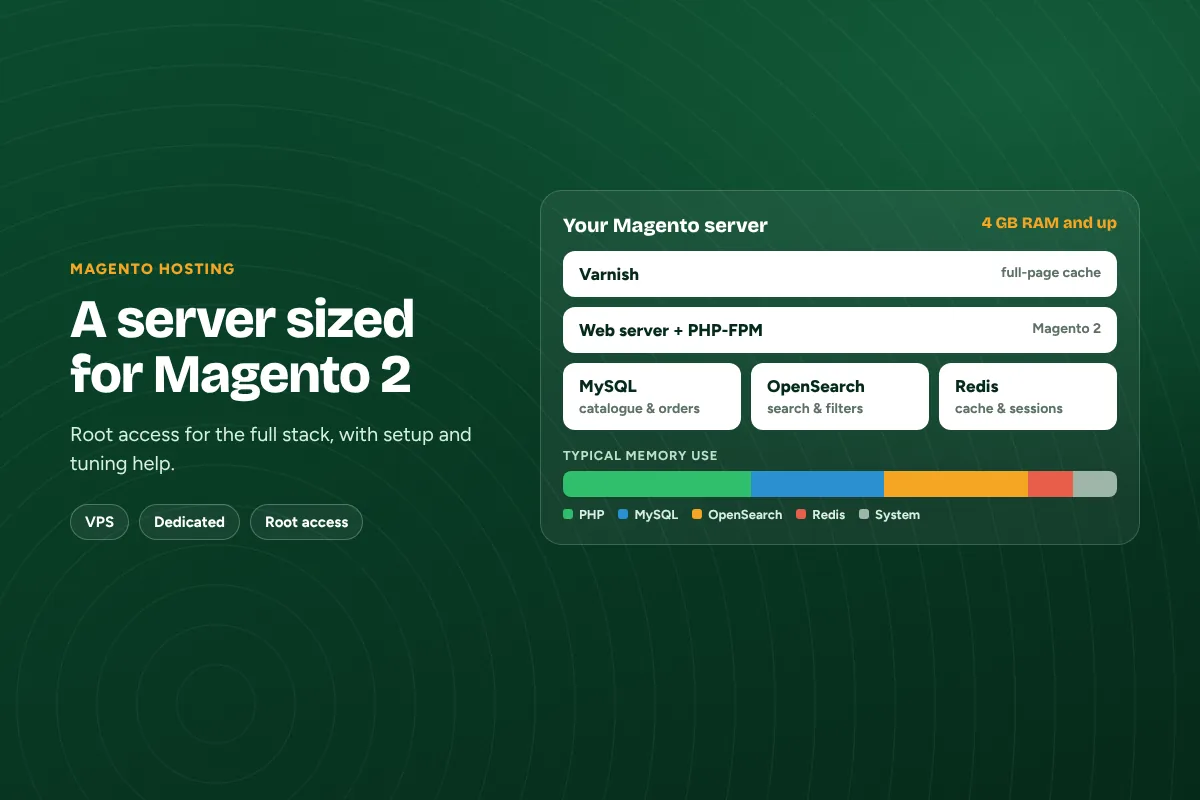
That power comes at a price in server resources. A modern Magento 2 store needs PHP 8 with many extensions, MySQL or MariaDB, Composer, a search engine (OpenSearch), and ideally Redis for caching and sessions and Varnish for full-page caching. Together they need several gigabytes of memory. Ordinary shared hosting cannot run this properly, so you will often see Magento stores in Pakistan that are slow, throw errors during sales, or have search switched off.
We are honest about this: we host Magento 2 on VPS and dedicated servers only, sized for your catalogue and traffic. You get full root access, NVMe storage and help from our team to install and tune the stack, and you pay in rupees by bank transfer, JazzCash or Easypaisa.
Magento VPS hosting
For new and small Magento 2 stores. Because Magento and OpenSearch need memory, we recommend VPS Enterprise with 4 GB RAM as the starting point; the smaller VPS plans suit development and staging copies.
Dedicated servers are set up to order. Contact us for stock and setup time.
Why Magento needs a VPS or dedicated server
Magento 2 is not a single program but a stack of services that work together. Each one needs memory and CPU of its own:
PHP-FPM runs Magento itself. Each page that is not cached, such as cart, checkout and account pages, uses a PHP process with a few hundred megabytes of memory.
MySQL or MariaDB stores products, prices, customers and orders. Large catalogues need memory for the database to stay fast.
OpenSearch powers catalogue search and layered navigation. Current Magento 2.4 releases require it, and it typically needs at least 1 to 2 GB of memory on its own.
Redis keeps Magento’s cache and customer sessions in memory, which makes the admin and storefront much faster.
Varnish serves full pages from memory for visitors browsing the catalogue, so PHP only works on pages that really need it.
Cron runs Magento’s background jobs every minute: indexing, emails, price rules and sitemaps.
Shared hosting limits memory and processes per account and does not allow services such as OpenSearch and Varnish, so a Magento 2 store on shared hosting will be slow and unreliable. A VPS gives you guaranteed resources and root access to run every part of the stack, and a dedicated server gives you a whole machine for large stores.
If your store is small and you do not need Magento’s advanced features, a WooCommerce store on shared hosting can be much cheaper to run. We are happy to help you compare.
What you get with Magento hosting
A server and a team that understand what Magento needs.
🔑
Full root access
Install the PHP version, extensions and services Magento needs, and tune every setting for your store.
💽
Fast SSD and NVMe storage
Fast disks for MySQL, indexing and image-heavy catalogues, so reindexing and imports finish quickly.
🔎
OpenSearch ready
Room to run OpenSearch on the same server for catalogue search and layered navigation, as Magento 2.4 requires.
🚀
Redis and Varnish
In-memory caching for sessions and pages, which makes a big difference to Magento’s speed on mobile.
🛡️
Security and SSL
Free SSL, firewall rules and DDoS protection on higher plans, plus help applying Magento security patches.
🧑🔧
Setup and tuning help
Our team can install the Magento stack, configure cron, caching and backups, and tune it for your catalogue.
Choosing the right server for your Magento store
The right size depends on your catalogue, your traffic and how many extensions you use. As a starting point:
Development and staging
A smaller VPS is fine for a developer’s test copy or a staging site where only your team logs in. It lets you try extensions and upgrades without touching the live store.
New or small live stores
For a store with up to a few thousand products and steady daily traffic, start with VPS Enterprise (4 cores, 4 GB RAM). It has enough memory for PHP, MySQL, OpenSearch and Redis together, and includes managed support and daily backups.
Growing and large stores
Stores with tens of thousands of products, several store views or languages, B2B features, or big sale days such as 11.11, Black Friday, Eid and Independence Day should run on a dedicated server. You get far more memory and CPU, NVMe storage and no neighbours sharing the hardware. Very large stores can split the database and search onto separate servers later.
Send us your product count, monthly visitors and current hosting details, and we will recommend a size, including whether a smaller server would do the job.
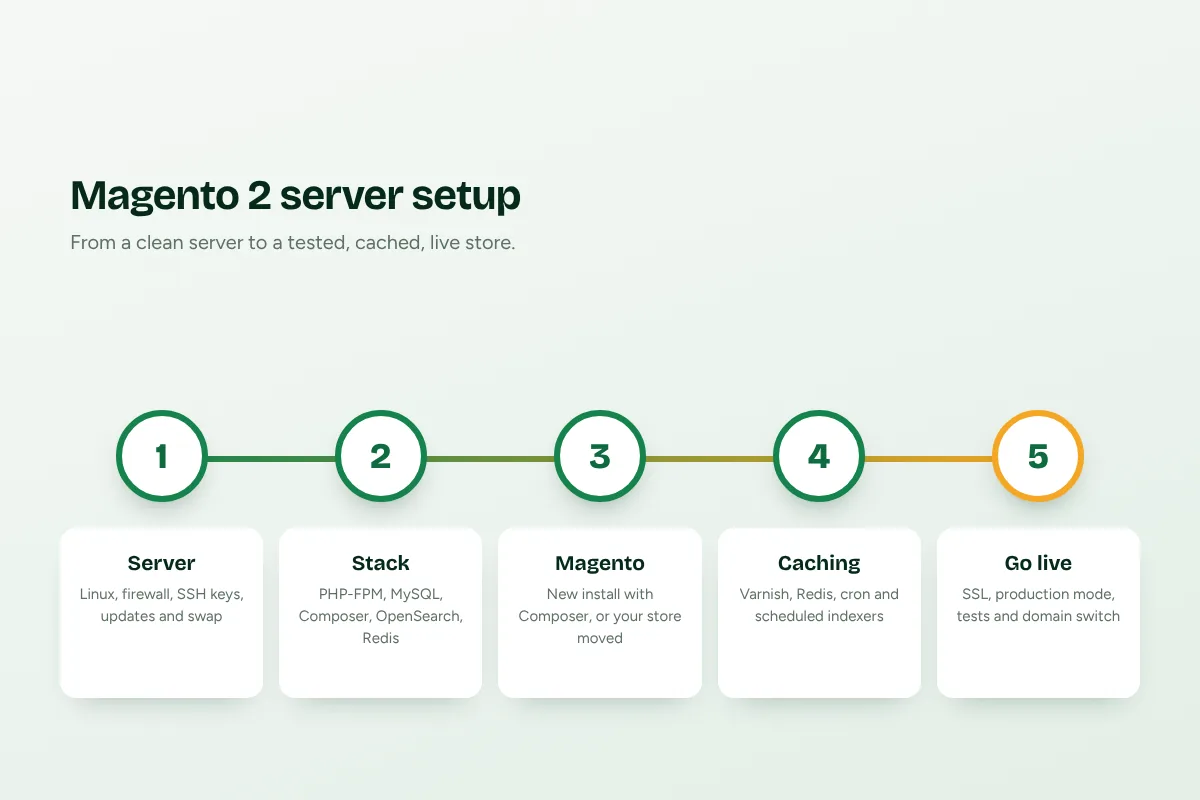
How we set up Magento 2 on your server
1. Prepare the server. We set up a clean Linux server with a firewall, SSH keys, automatic security updates and swap space, and point your domain to it.
2. Install the stack. We install the web server, PHP-FPM with the extensions Magento requires, MySQL or MariaDB, Composer, OpenSearch and Redis, using versions supported by your Magento release.
3. Install or move Magento. For a new store we install Magento with Composer. For an existing store we copy the code, media and database from your current host and update the configuration.
4. Caching and background jobs. We configure Redis for cache and sessions, Varnish for full-page caching, Magento cron jobs and indexers set to update on schedule.
5. SSL, production mode and go-live. We install free SSL, switch Magento to production mode, compile code and deploy static content, test checkout and search, then switch your domain with as little downtime as possible.
Magento for the Pakistani market
The things Pakistani Magento stores need, beyond the server.
Cash on delivery and bank transfer
Magento includes cash on delivery and bank transfer payment methods, which most Pakistani shoppers still prefer.
Local wallets and card payments
JazzCash, Easypaisa and local card gateways can be connected through their Magento extensions or a custom integration.
Courier booking and tracking
Connect couriers such as TCS, Leopards, PostEx and Trax through extensions or their APIs, so orders are booked and tracked automatically.
Prices in PKR and city-based delivery
Set Pakistani rupees as the base currency, configure delivery rates by city, and offer free delivery above a basket value.
Urdu and English store views
Magento’s store views let you run English and Urdu versions of the same store, each with its own URLs and content.
Selling abroad
Run additional store views with other currencies for customers in the Gulf, UK or North America, from one Magento admin.
Keeping a Magento store fast
Run in production mode. Developer mode is much slower. Deploy with setup:di:compile and setup:static-content:deploy, then switch to production mode.
Use Varnish and Redis. Full-page caching in Varnish and cache and sessions in Redis are the two biggest speed gains for most stores.
Index on schedule. Set indexers to “Update by schedule” and make sure Magento cron runs every minute, so saving a product does not slow down the whole store.
Be careful with extensions. Each extension adds code to every page. Remove what you do not use, and test new ones on a staging copy first.
Optimise images. Product photos from studios are often huge. Resize them and serve WebP where your theme supports it, so category pages load quickly on mobile data.
Apply security patches. Magento releases regular security updates. Plan an update window every few months, test it on staging and then apply it to the live store.
Load test before big sales. Before an 11.11 or Eid campaign, test your store with expected traffic and tell us, so we can check the server and add resources if needed.
Still on Magento 1, or thinking about switching?
Magento 1 reached its end of life in June 2020 and no longer receives official security patches. If your store still runs on it, it is at real risk, and it will not run on modern PHP versions. You have three realistic options:
Migrate to Magento 2. The best choice if you rely on Magento’s advanced catalogue and pricing features. Products, customers and orders can be moved with Magento’s data migration tool, while the theme and extensions are rebuilt for Magento 2.
Move to WooCommerce. A good choice for small and medium stores that want lower running costs and simpler management. Our web development team can rebuild the store, and it can then run on shared hosting.
Keep Magento 1 temporarily on a community fork. Projects such as OpenMage continue to patch Magento 1, which can buy time, but it is a stop-gap, not a long-term plan.
We will look at your store, your budget and your plans before recommending one, and we can host whichever you choose.
We do not recommend it, and we do not sell shared hosting for Magento 2. Current Magento releases need OpenSearch and several gigabytes of memory, which shared hosting cannot provide reliably. A VPS or dedicated server gives your store the resources it needs.
Which VPS is the minimum for a live Magento store?
For a live store we recommend VPS Enterprise, with 4 CPU cores and 4 GB RAM, as the starting point. Smaller VPS plans are fine for development and staging. Large stores should use a dedicated server.
Do you install Magento for me?
Yes. Our team can prepare the server and install the full Magento stack, including PHP, MySQL, OpenSearch, Redis, Varnish, SSL and cron, or move your existing store.
Can you migrate my Magento store from another host?
Yes. We copy your code, media and database to the new server, test it on a temporary address and switch your domain at a quiet time, so orders are not lost.
Do you support Adobe Commerce?
Adobe Commerce, the paid edition, can run on our dedicated servers under your own Adobe licence. Most Pakistani stores use the free Magento Open Source edition, which we fully support.
Can I accept JazzCash and Easypaisa on Magento?
Yes, through the payment extensions available for Magento or a custom integration with the gateway’s API. Cash on delivery and bank transfer are built into Magento.
Are backups included?
VPS Pro includes weekly backups, and VPS Enterprise and the Enterprise dedicated server include daily backups. On other servers we can set up a backup schedule with you. We also recommend regular database dumps before upgrades and big catalogue imports.
Can I upgrade my server later?
Yes. You can move from a smaller VPS to a larger one, or from a VPS to a dedicated server, as your store grows. We plan the move with you so the store keeps taking orders.
Do you manage the server for me?
VPS Enterprise and the Professional and Enterprise dedicated servers include managed support. On other plans you manage the server yourself, and our team is available to help when you need it.
How do I pay for Magento hosting?
You pay in Pakistani rupees by bank transfer, JazzCash or Easypaisa. No dollar card is needed.
Planning a Magento store or a move?
Share your product count, monthly visitors and current host. We will recommend a server size and help you set it up or move it.